
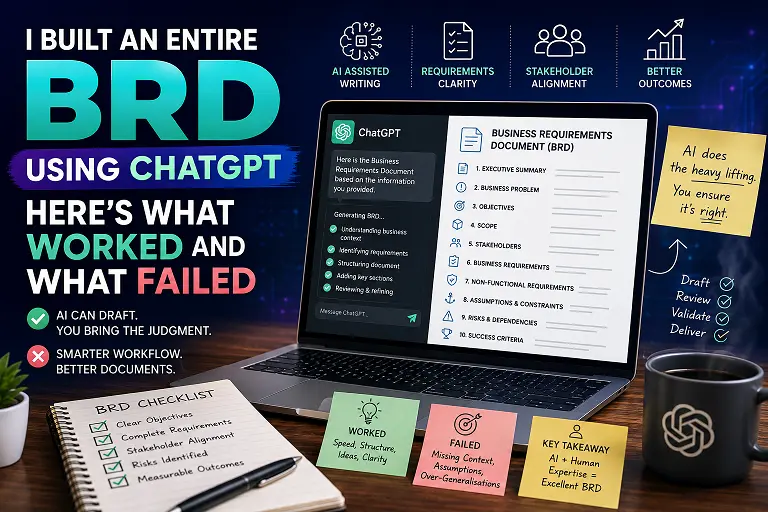
Can You Really Create a BRD Using ChatGPT?
Business Requirements Documents, commonly known as BRDs, are among the most important deliverables created by Business Analysts. They capture the business problem, objectives, scope, requirements, stakeholders, assumptions, constraints, and expected outcomes of a project. Let’s talk about how to create a BRD using ChatGPT.
But creating a good BRD can take hours or even days. Hence, creating a BRD using ChatGPT is a great idea.
So I decided to test something that many Business Analysts are already experimenting with: creating a BRD using ChatGPT.
The objective was not simply to ask ChatGPT to “write a BRD.” Instead, I wanted to see whether ChatGPT could actually assist with the complete BRD creation process, from understanding the business problem to identifying requirements and improving the final document.
The results were interesting.
Some parts worked surprisingly well. Others required significant human intervention.
My Approach to Creating a BRD Using ChatGPT
The first mistake would be giving ChatGPT a single sentence and expecting a complete, professional BRD.
Instead, I treated ChatGPT like a Business Analyst assistant.
I started by providing the business context, target users, project objectives, known challenges, and expected outcome.
My initial prompt looked something like this:
Act as a Senior Business Analyst. I am working on a new digital product. Help me create a Business Requirements Document. Before generating the document, ask me the questions required to understand the business problem, stakeholders, scope, assumptions, and expected outcomes.
This changed everything.
Rather than immediately generating generic content, ChatGPT started asking questions.
That made the output much more useful.
What Worked Well When Creating a BRD Using ChatGPT
1. Requirement Brainstorming Was Extremely Useful
One of the biggest advantages was brainstorming.
After explaining the business problem, I asked ChatGPT to identify possible requirements that I might have missed.
It generated suggestions across different areas, including:
- Functional requirements
- Non-functional requirements
- User roles
- Business rules
- Notifications
- Reporting
- Security
- Integrations
- Exception scenarios
This was particularly useful because it gave me a second perspective.
However, I did not blindly accept every suggestion.
A Business Analyst still needs to determine whether a suggested requirement actually makes sense for the business.
2. Creating the BRD Structure Became Faster
ChatGPT was very good at organizing information.
A typical BRD might contain sections such as:
- Executive Summary
- Business Problem
- Business Objectives
- Project Scope
- Stakeholders
- Current State
- Future State
- Business Requirements
- Functional Requirements
- Non-Functional Requirements
- Assumptions
- Constraints
- Dependencies
- Risks
- Success Criteria
Instead of starting from a blank document, I could provide the available information and ask ChatGPT to organize it into an appropriate structure.
This saved considerable time.
3. Turning Business Language Into Requirements
This was another area where ChatGPT performed well.
Stakeholders often describe problems using business language rather than technical requirements.
For example:
“Customers should be able to complete the application faster.”
This is a business objective, not a complete requirement.
ChatGPT can help break this down into potential requirements around application steps, validation, data capture, integrations, notifications, and completion tracking.
The Business Analyst then validates these requirements with stakeholders.
That distinction is extremely important.
AI can help transform information. The Business Analyst validates the meaning.
4. Identifying Ambiguous Requirements
I also asked ChatGPT to review requirements specifically for ambiguity.
For example:
“The system should respond quickly.”
ChatGPT correctly identified that “quickly” is ambiguous.
How quickly?
Two seconds?
Five seconds?
Ten seconds?
A better requirement might define a measurable response time under specific conditions.
This makes AI particularly useful as a requirements quality reviewer.
What Did Not Work When Creating a BRD Using ChatGPT?
This is where things became interesting.
ChatGPT can produce a document that looks professional while still being wrong.
And that is potentially dangerous.
1. AI Can Invent Requirements
One of the biggest problems was hallucination.
If sufficient business context is not provided, ChatGPT may generate requirements that sound logical but were never requested by the business.
For example, it might suggest:
- Multi factor authentication
- Advanced dashboards
- Automated notifications
- Multiple user roles
- Additional integrations
These might be useful features.
But useful does not automatically mean required.
A Business Analyst must separate actual requirements from AI generated assumptions.
2. Generic Requirements Sound Better Than They Actually Are
Another problem was generic language.
Statements such as:
“The system should provide a seamless user experience.”
sound professional but provide very little value to developers or testers.
A good requirement needs clarity and, wherever possible, measurable criteria.
AI can write polished sentences.
That does not automatically make them good requirements.
3. Context Gets Lost in Long Conversations
When working with a large project, ChatGPT may lose track of certain details as the conversation becomes longer.
A requirement mentioned earlier might not always be reflected correctly in a later section.
This means the final BRD needs a proper review.
For large projects, it is better to work in logical sections and provide relevant context when generating each section.
4. AI Does Not Understand Your Stakeholders Like You Do
This was probably the biggest limitation.
A Business Analyst understands the people behind the requirements.
You know which stakeholder is difficult to convince.
You know which business rule has changed three times.
You know which requirement is politically sensitive.
You understand why a particular department wants something and why another department might reject it.
ChatGPT does not have that organizational context unless you provide it.
And even then, human judgment remains critical.
The Best Way to Use ChatGPT for BRD Creation
After experimenting with BRD using ChatGPT, I would not recommend asking AI to create the entire document in one shot.
Instead, use a collaborative workflow.
Step 1: Understand the Business Problem
Give ChatGPT the available information and ask it to identify gaps.
Step 2: Ask Discovery Questions
Let AI generate questions that can help during stakeholder interviews.
Step 3: Document the Business Requirements
Provide validated information and ask AI to structure it.
Step 4: Challenge the Requirements
Ask ChatGPT to identify ambiguity, duplication, conflicts, missing scenarios, and assumptions.
Step 5: Generate Supporting Documentation
Use AI to create user stories, acceptance criteria, process descriptions, test scenarios, and other supporting artifacts.
Step 6: Perform Human Validation
This is the most important step.
Review everything against actual stakeholder discussions and approved business decisions.
What Should Business Analysts Let AI Do?
AI is excellent at tasks such as:
- Brainstorming
- Summarizing
- Structuring information
- Identifying gaps
- Rewriting documentation
- Generating questions
- Creating draft user stories
- Reviewing requirements
- Generating test scenarios
- Creating alternative explanations
These are areas where AI can save significant time.
What Should Business Analysts Still Do?
Do not outsource these responsibilities completely:
- Stakeholder management
- Requirement validation
- Negotiation
- Conflict resolution
- Business decision making
- Prioritization
- Understanding organizational politics
- Final requirement approval
- Assessing business impact
These activities require context, judgment, communication, and experience.
That is where the Business Analyst continues to add significant value.
Final Verdict: Is Creating a BRD Using ChatGPT Worth It?
Absolutely.
But there is an important difference between creating a BRD with ChatGPT and asking ChatGPT to create your BRD.
The first approach makes AI your assistant.
The second approach makes AI responsible for something it cannot fully understand.
My biggest takeaway is simple:
Do not use AI to replace Business Analysis. Use AI to accelerate Business Analysis.
ChatGPT can help you go from a blank page to a structured BRD much faster. It can help identify gaps, improve wording, challenge requirements, and generate supporting documentation.
But the final quality of the BRD still depends on the Business Analyst.
If you understand the business, ask the right questions, validate the requirements, and use AI intelligently, you can create better documentation in significantly less time.
And that is where the real opportunity lies for the AI Business Analyst.
Frequently Asked Questions
Can ChatGPT create a complete BRD?
Yes, ChatGPT can generate a BRD structure and draft content. However, the Business Analyst must provide context, validate requirements, and review the final document.
Is it safe to use ChatGPT for business requirements?
It depends on your organization’s security and data protection policies. Never enter confidential or sensitive business information into an AI tool unless your organization has approved its use for that purpose.
Can ChatGPT replace a Business Analyst?
No. ChatGPT can assist with documentation, analysis, brainstorming, and other tasks, but stakeholder management, business judgment, negotiation, and validation still require human expertise.
What is the best way to use ChatGPT as a Business Analyst?
Use ChatGPT as an assistant throughout the Business Analysis lifecycle. Ask it to brainstorm, analyze, structure, review, and challenge your work rather than blindly generating the final deliverable.

AI + Business Analysis Consultant. Helping Business Analysts work smarter with AI.
Leave a Reply